Rename pictures
IMG_4210.jpg says nothing. 2023-09-06_Baixa_001.jpg says when and where. Rename a whole trip by a template, and see every new name before one file changes.
In the app: ? at the top right of the window, or F1, opens this page.
In the manager: F2 with several pictures chosen (with none chosen, all shown), or right-click a folder → Rename pictures…. F2 on one picture renames just that one, in place.
The Rename window
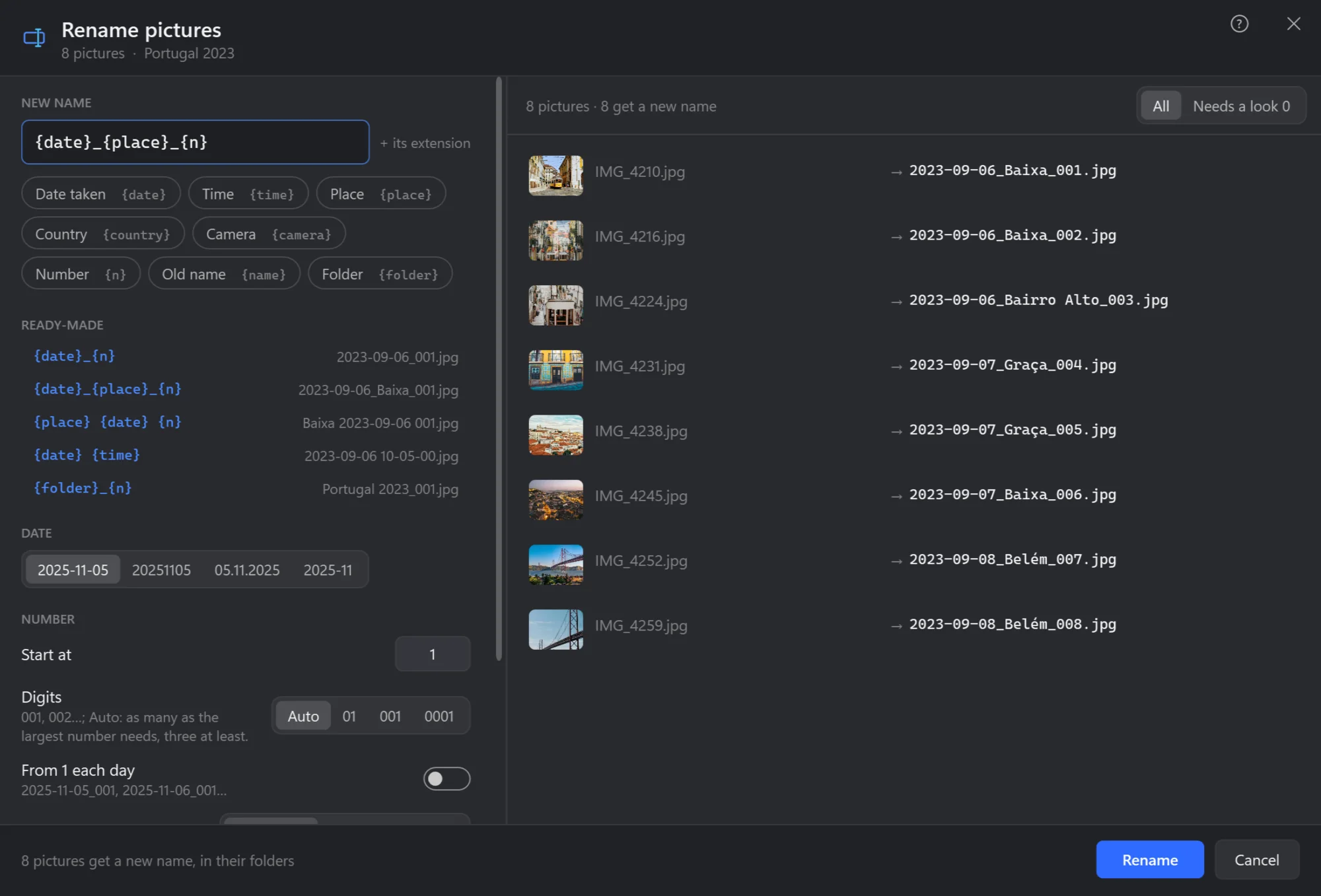
- New name. The template: words in braces are filled in for each picture, everything else stays as written. The extension is kept.
- The parts. Click one to put it in: date taken, time, place, country, camera, number, old name, folder.
- Ready-made. Templates to start from, each with what it makes of the first picture.
- Date. How dates are written:
2025-11-05,20251105,05.11.2025or only the month. - Number. Where it starts, how many digits, from 1 again each day, and in which order: date taken, name, or as shown.
- Every picture, its name now and the name it gets. A name that would be taken gets a number after it.
- Needs a look. Only the pictures something is missing for — no date taken, no place — with why.
- Rename. Every picture in its own folder. Ctrl+Z in the manager puts the old names back.
What can go in a name
| Part | Becomes |
|---|---|
{date} | The day it was taken, written as chosen under Date: 2023-09-06 |
{time} | The time it was taken: 18-44-10 |
{place} | The town it was taken in, from its GPS: Baixa |
{country} | The country, from its GPS: Portugal |
{camera} | The camera or phone: NIKON D610 |
{n} | A number: 001, 002… in the order chosen |
{name} | Its name now, without the extension |
{folder} | The name of the folder it is in |
When something is missing
A screenshot or a download has no date taken; a photo from a camera without GPS has no place. The window says how many lack something, and Needs a look shows them. Under When a picture has no date taken, Use the file's date takes the day it was last changed instead. A photo kept only in the cloud is not read — reading would download it — and keeps its name.
Also there: Extension in small letters — .JPG → .jpg.