The editor window
One photo, every tool around it. Everything you change can be undone, step by step, until you save — and after saving too.
Open a photo in the editor with Edit (E) in the viewer, in the manager or in the drop panel. It works on the picture in 16 bits per colour, so even strong changes of light leave no bands in a sky.
Every part of it
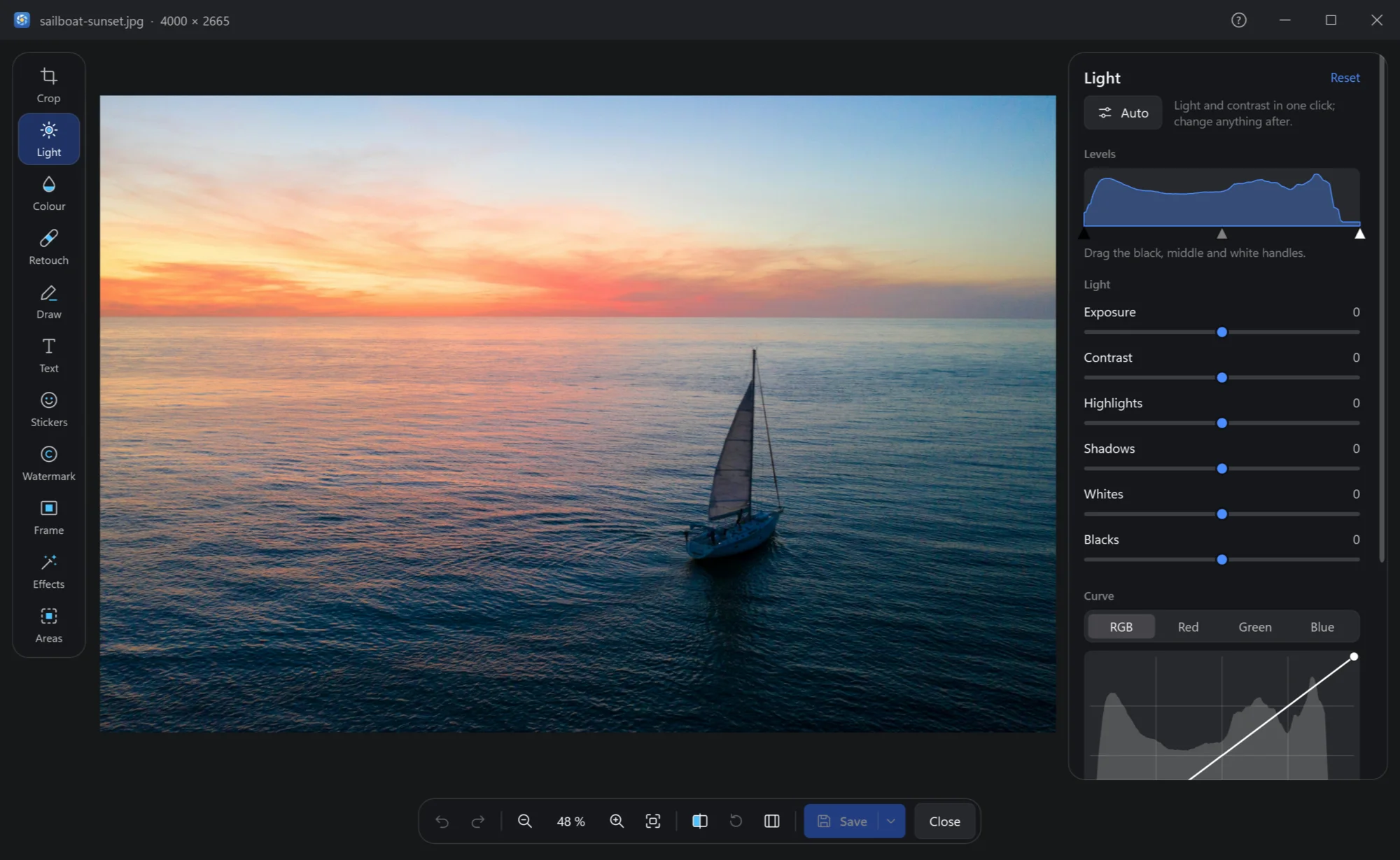
- The title. The file's name and its size in pixels.
- The tools. Crop, Light, Colour, Retouch, Draw, Text, Stickers, Watermark, Frame, Effects and Areas — each with its key (R, D, T…) in its tip.
- The photo, with everything changed shown at once. The wheel zooms; drag to move a zoomed photo.
- The tool's panel. Its sliders and choices; Reset at its top puts this tool's changes back. A double click on a slider sets it back to 0.
- Undo, redo. Every change, step by step. Ctrl+Z Ctrl+Y
- Zoom. Out, the zoom now (fit or 100 %), in, fit. − + 0 1
- Before. Hold it — or \ — to see the original, let go for your version.
- Undo all changes — itself one step you can undo.
- Panels. Hide the tools and the panel to see the photo alone. Tab
- Save (Ctrl+S), and by its arrow the other ways to save — see below.
Saving
Save asks what to do with the original:
| Choice | What happens |
|---|---|
| Replace | The edited photo takes the original's place. The original is kept as a backup for a week: Ctrl+Z in the viewer or the manager puts it back. |
| Save beside it | As name (edited).jpg; the original stays as it was. Ctrl+Z sends the edited copy to the Recycle Bin. |
Don't ask again makes your choice the rule — Settings → Editor → Saving an edited picture changes it later. The date taken, the camera and the place are kept either way. A camera's RAW file is never replaced: a JPEG copy goes beside it.
The arrow next to Save also offers Save beside it as JPEG, Save a copy… anywhere and in any format (Ctrl+Shift+S), and Copy to clipboard (Ctrl+C), to paste the edited photo into a chat or a document without saving a file. Closing with changes not saved asks first.
RAW files
A camera's RAW file opens developed from what the sensor recorded: the whole frame, more left in bright skies and dark corners, and the white balance on the real light — Light can bring back a sky that looks white in the camera's JPEG. It takes a second or more. To edit the camera's own picture inside the RAW file instead, turn off Settings → Editor → Develop RAW files.
Keys
| Keys | What they do |
|---|---|
| Ctrl+Z, Ctrl+Y Ctrl+Shift+Z | Undo, redo |
| Ctrl+S, Ctrl+Shift+S | Save; save a copy |
| Ctrl+C | Copy the edited photo |
| \ | The original, while held |
| Tab | Hide or show the panels |
| R D T S W F E A | Crop, Draw, Text, Stickers, Watermark, Frame, Effects, Areas |
| [ ] | In Retouch: the brush smaller, bigger |
| Del | Remove the chosen text, drawing, sticker, area or retouch stroke |
| + −, wheel, 0, 1 | Zoom in, out; fit; 100 % |
| Esc | Close (asks about unsaved changes) |